FINDING YOUR TARGET MARKET IS KEY TO SUCCES and critical to the development of your TRM BUSINESS DEVELOPMENT PLAN. (TRMBDP) It is the beginning and end of the METHODOLOGY. Target marketing is picking a specific group of people or businesses you want to serve, then tailoring your message, offer, channels, and follow-up to fit them—instead of trying to market to “everyone.”
The following is intended to provide a STEP by STEP Training Program to find your Target Market.
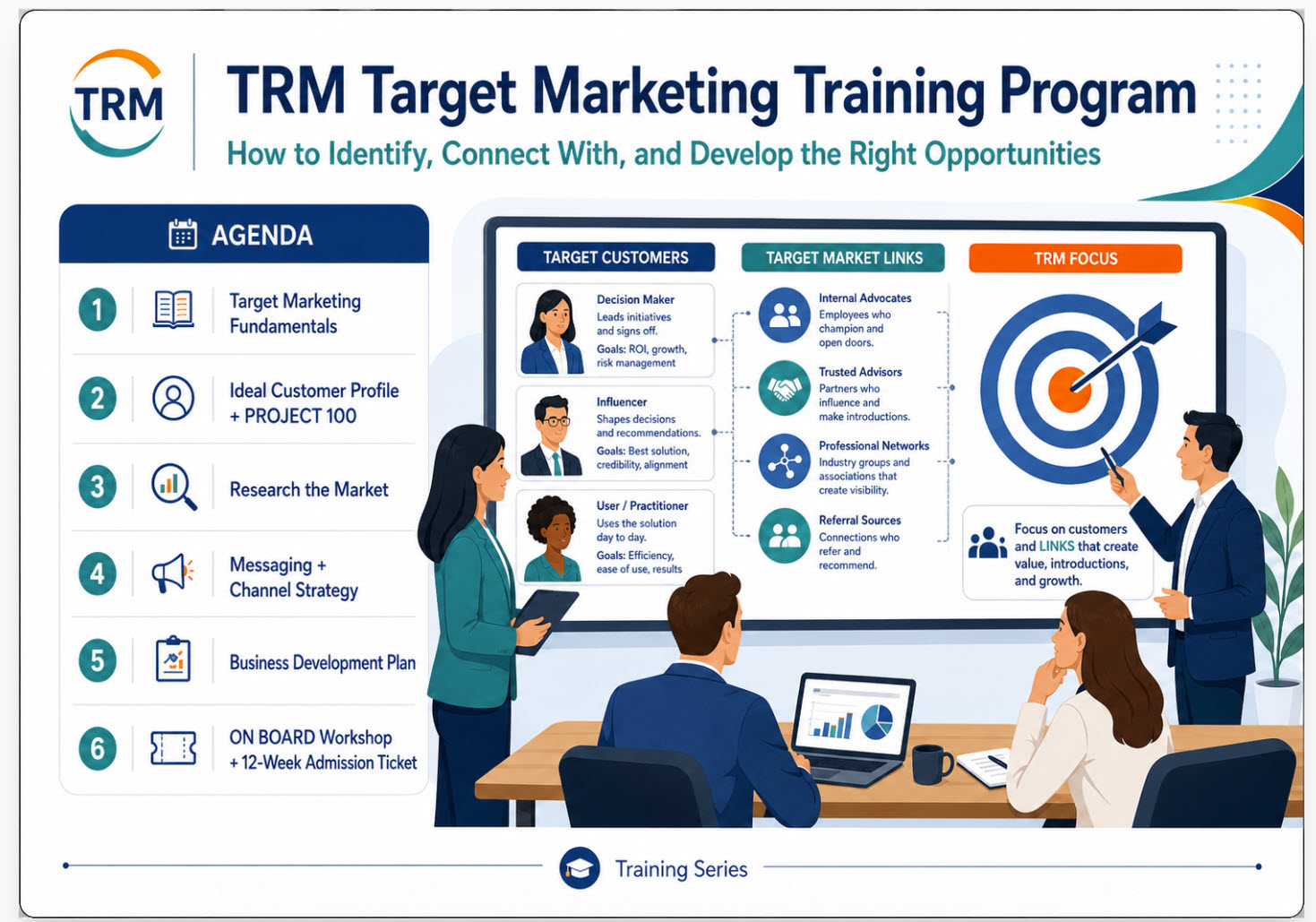
Welcome everyone. Today’s session is about learning how to identify, reach, and convert the right customers. The key idea is simple: not every customer is the best customer for your business. When we understand who we serve best, we can focus our marketing, improve results, and avoid wasting time and money.
We’ll cover six areas: the fundamentals of target marketing, how to define an ideal customer profile, how to research the market, how to match messaging and channels, how to plan campaigns and measure KPIs, and finally how to turn this into a 30-day action plan.
Target marketing means focusing on the customers most likely to buy, benefit, and stay engaged. Instead of trying to reach everyone, we narrow our focus so our message becomes more relevant.
There are four common ways to segment an audience: demographic, geographic, psychographic, and behavioral. Demographics include things like age, income, and role. Geography looks at region or location. Psychographics focus on values, interests, and lifestyle. Behavioral segmentation looks at usage, loyalty, and buying habits.
The reason this matters is that sharper targeting leads to sharper messaging, better offers, and smarter channel choices.
LIST three possible audience segments for your own business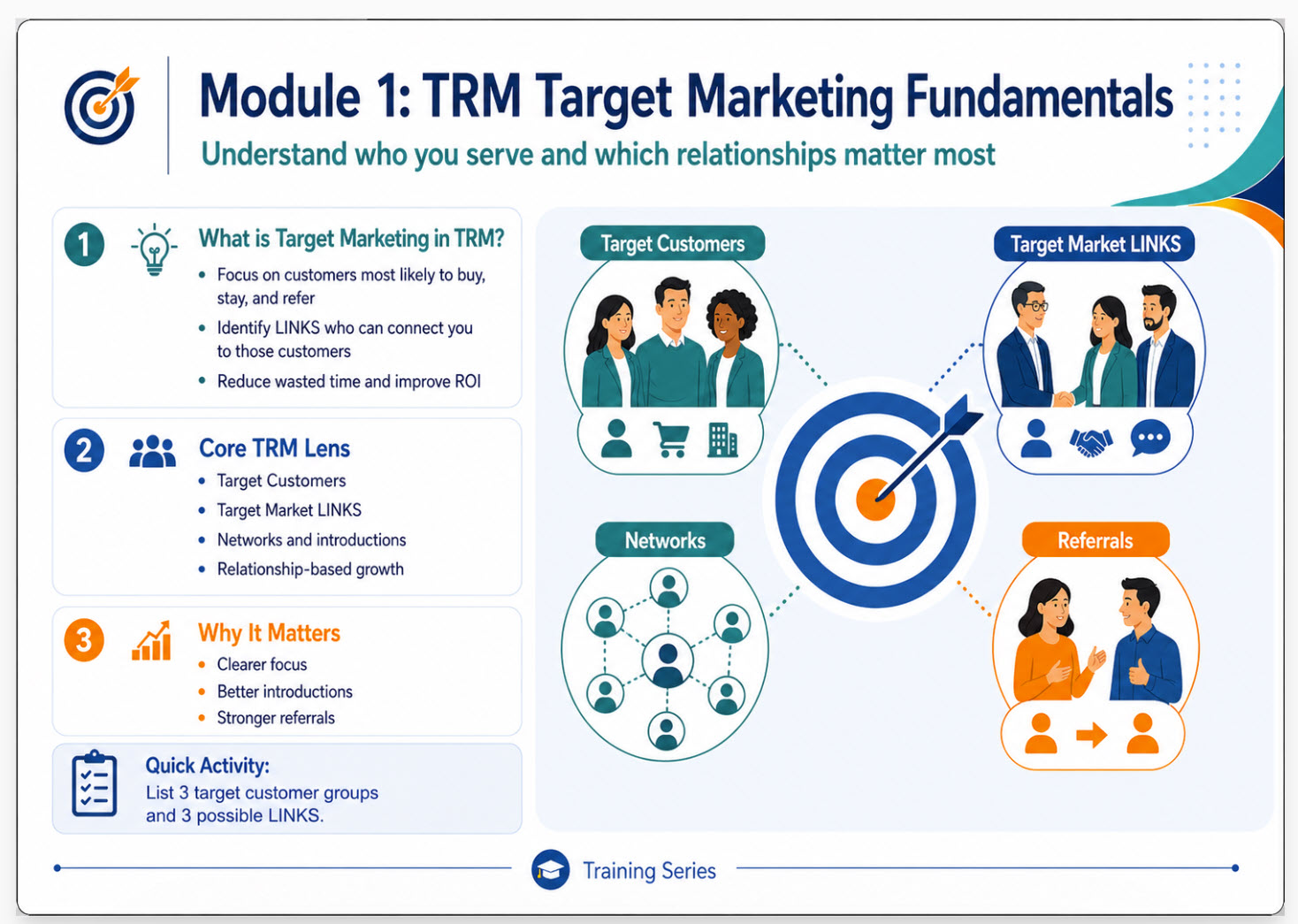
Target marketing means focusing on the customers most likely to buy, benefit, and stay engaged. Instead of trying to reach everyone, we narrow our focus so our message becomes more relevant.
The TRM approach identifies a specific CUSTOMER target Market as well as LINKS or influencers with direct access to that market. When networking at EVENTS, locating LINKS and developing symbiotic relationships is the PRIORITY.
Each LINK is encouraged to build their own NETWORK of LINKS who do not compete to share IDEAS, INFORMATION, RESOURCES, REFERRALS and INTRODUCTIONS.
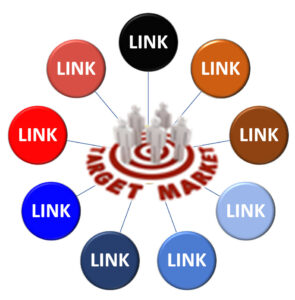
The objective is to build a NETWORK of 12 qualifying LINKS either personally recruited or otherwise joined. Each LINK who recruits a LINK member will receive a $400 LINK BONUS. A NETWORK of 12 active LINKS is expected to create 300 referrals converting to 100 sales in year 1, and 100 in year 2 and 100 never for each member.
A LINK may then request to become an EXECUTIVE LINK, and if approved, become a Limited Partner and share in NETWORK TRM income.
The Limited Partner is responsible for expenses and Growth & Development of the NETWORK. The Limited Partner receives current income as well as residual income creating a TRM equity position.
Target marketing means focusing on the customers most likely to buy, benefit, and stay engaged. Instead of trying to reach everyone, we narrow our focus so our message becomes more relevant.
There are four common ways to segment an audience: demographic, geographic, psychographic, and behavioral. Demographics include things like age, income, and role. Geography looks at region or location. Psychographics focus on values, interests, and lifestyle. Behavioral segmentation looks at usage, loyalty, and buying habits.
The reason this matters is that sharper targeting leads to sharper messaging, better offers, and smarter channel choices. In TRM there are two IDEAL PROFILES. 1 – IDEAL CUSTOMER PROFILE, ICP, for each Target Market and 2 – IDEAL LINK PROFILE (ILP) for each target market including industries who are potential LINK members.
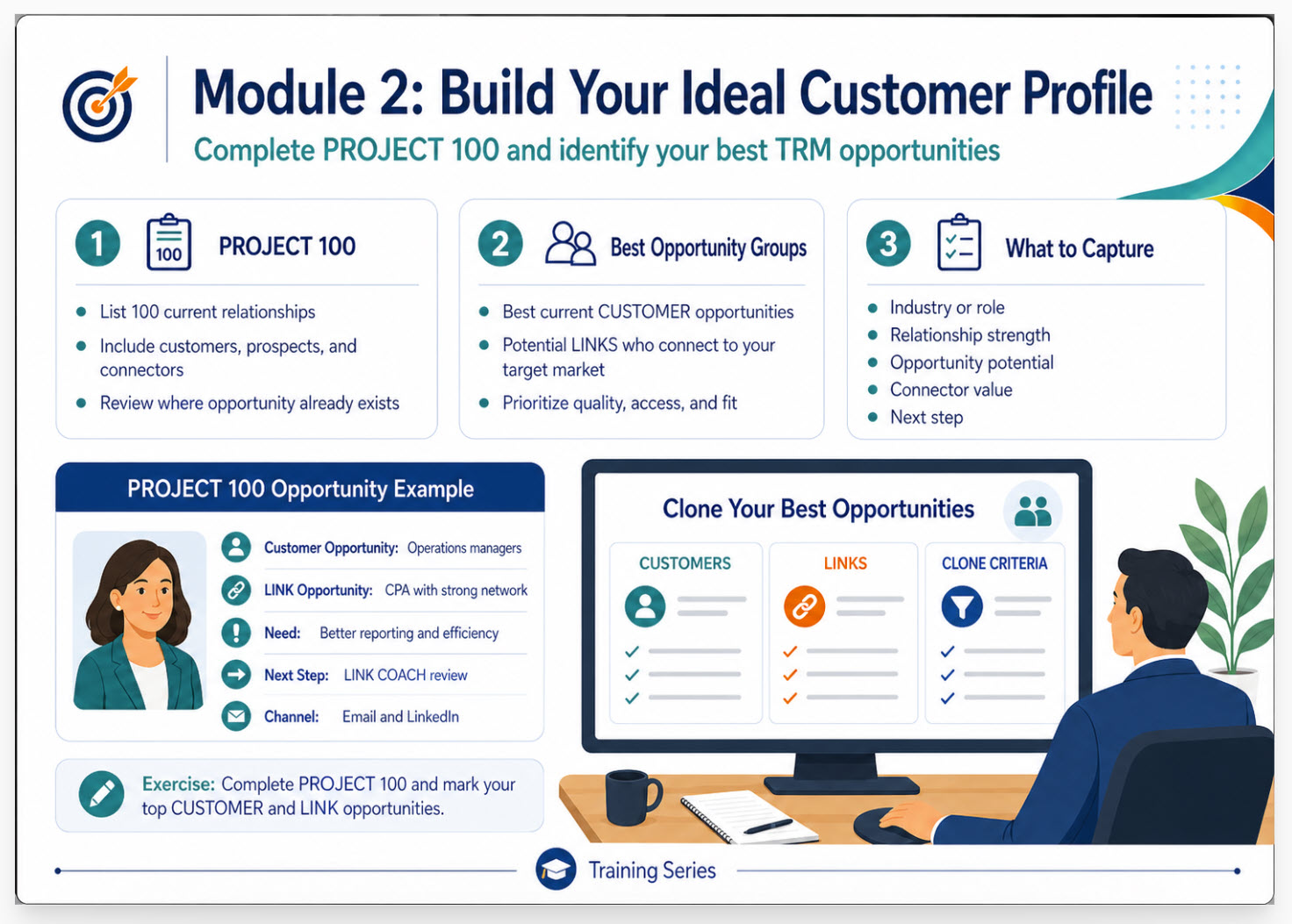
Your COACH will provide you with a PROJECT 100 template to complete and review.
Your LINK COACH will then research the market place to identify and CLONE those who are your best opportunities.
Go to CHATGPT and ask for industry types which share your Target Market and compare that list to your PROJECT 100.
Attend EVENTS where these targets are likely to go to network.
GO to CHATGPT and ask for a list of events including those attended by executives in your target market.
Click HERE to find a list of TAMPA BAY Chambers and INDUSTRY specific Associations.
If you want to hunt elephants go to their local watering hole. If you want to hunt accountants, go to where they congregate and network. Research your target market by joining a local association.
This begins the implementation of the LINK System. Make sure you share your digital business and including the TRM Business Development Platform and VIP membership opportunity. This creates an exponentially growing database of business opportunities.
Before marketing, we need to define the best-fit customer. The Ideal Customer Profile, or ICP, describes the company or customer type we serve best. It is based on fit, value, and buying potential.
A buyer persona is more humanized. It represents one ideal buyer and includes that person’s goals, pain points, motivations, and preferred communication channels.
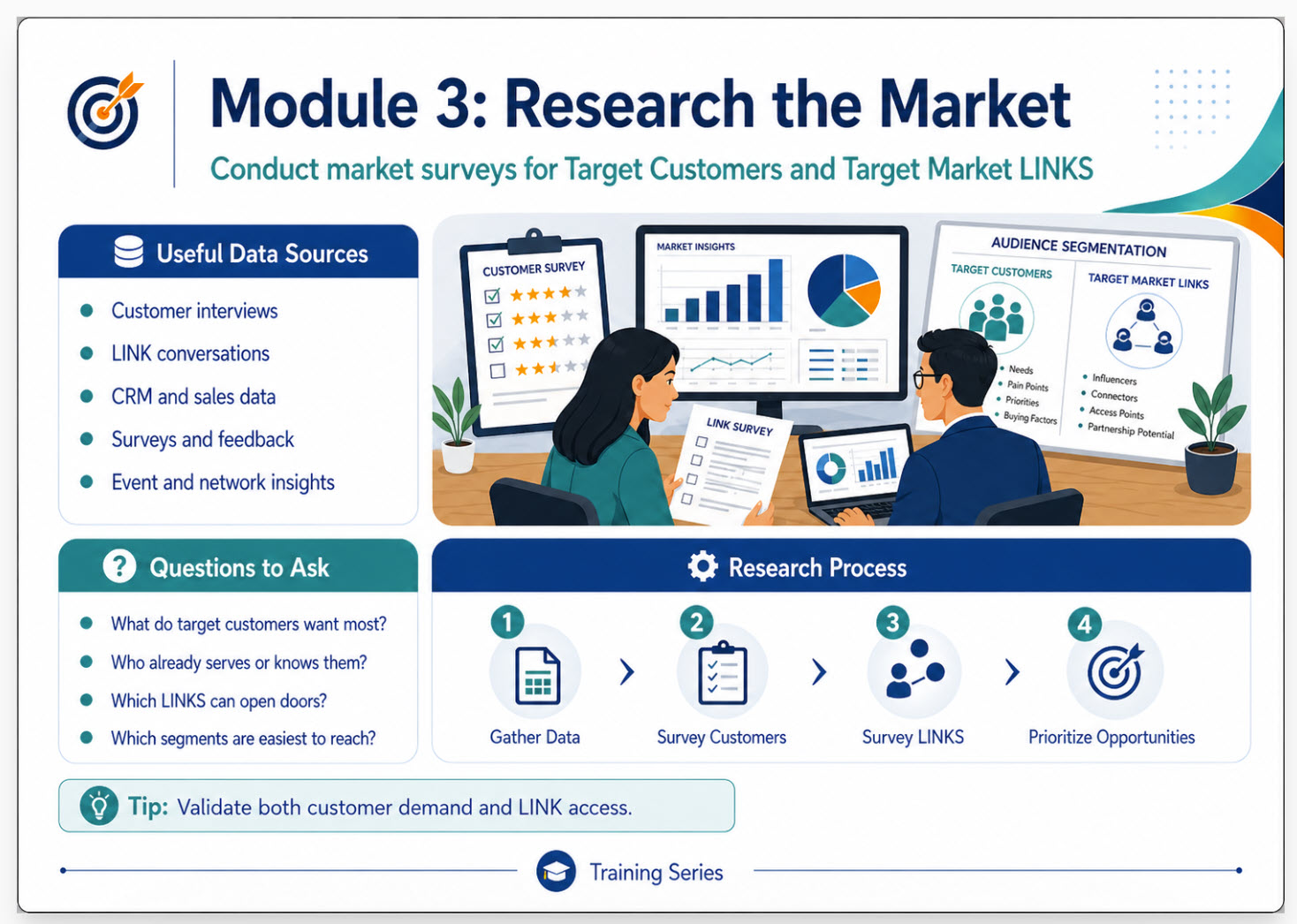
This is accomplished by meeting with customers and or potential customers and conducting a Market Survey. CLICK HERE to learn more and down SURVEY.
 Targeting should be based on evidence, not guesses. Useful data sources include customer interviews, CRM and sales data, website and social analytics, surveys, feedback, and competitor analysis.
The questions to ask are: Who buys most often? Who gets the most value? Which segments are easiest to reach? Which segments are most profitable?
The process is to gather data, identify patterns, create segments, and prioritize opportunities. The key tip is to look for segments that are profitable, reachable, and aligned with your strengths.
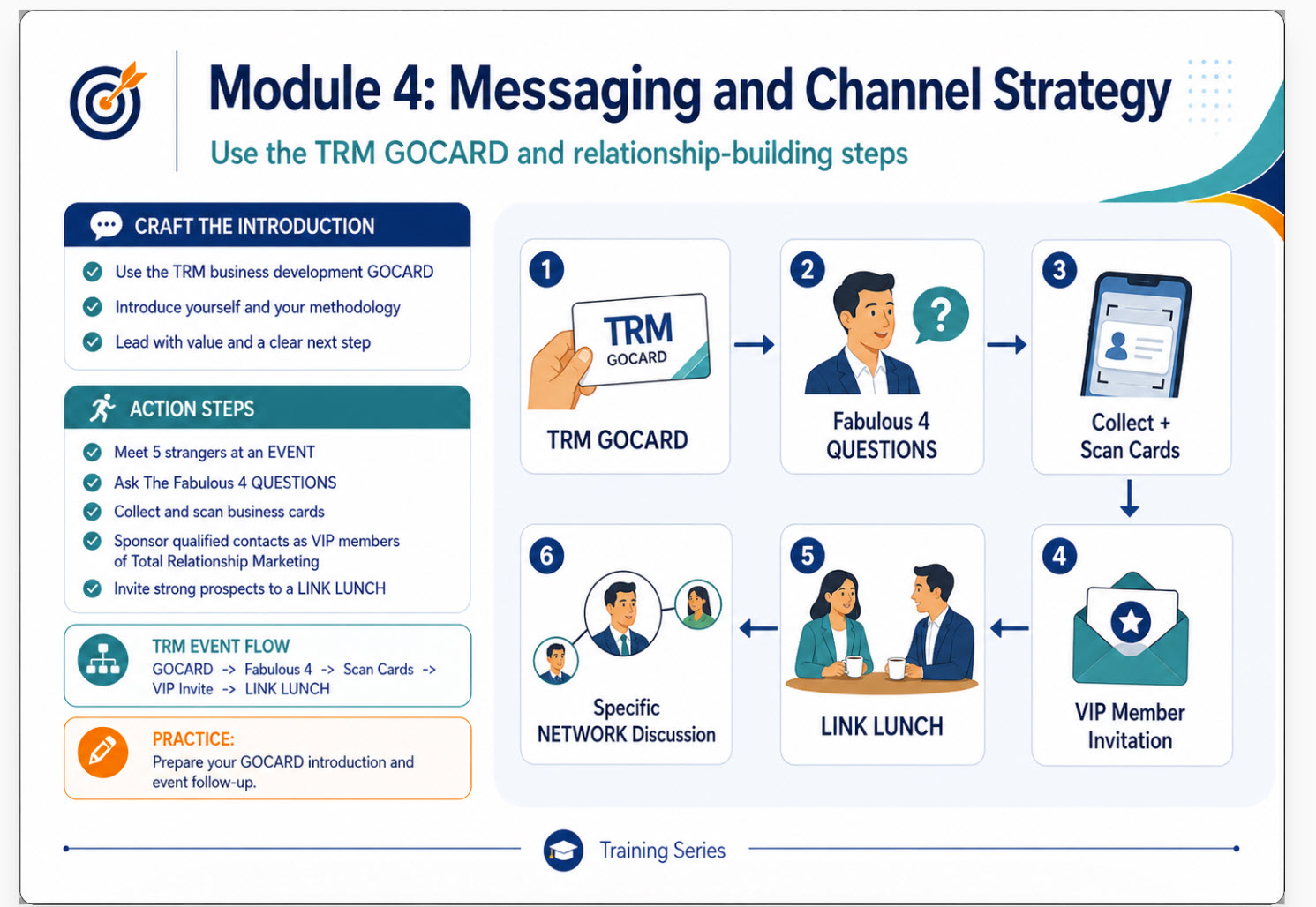
The TRM digital GOCARD is a tool used to communicate with contacts to begin the relationship development process.
When attending a LINK LUNCH, begin every meeting with a GIFT which could specifically relate to your firm. Ask questions to learn about your lunch partners GOALS, CONCERNS, WANTS, NEEDS. DEMONSTRATE your TRM business development GOCARD and VIP GIFT to see if a LINK invitation might be warranted.
If so suggest individual for membership, TRM will follow up with communications and finish the REGISTRATION. When successful, you will receive a $400 recruiting BONUS.
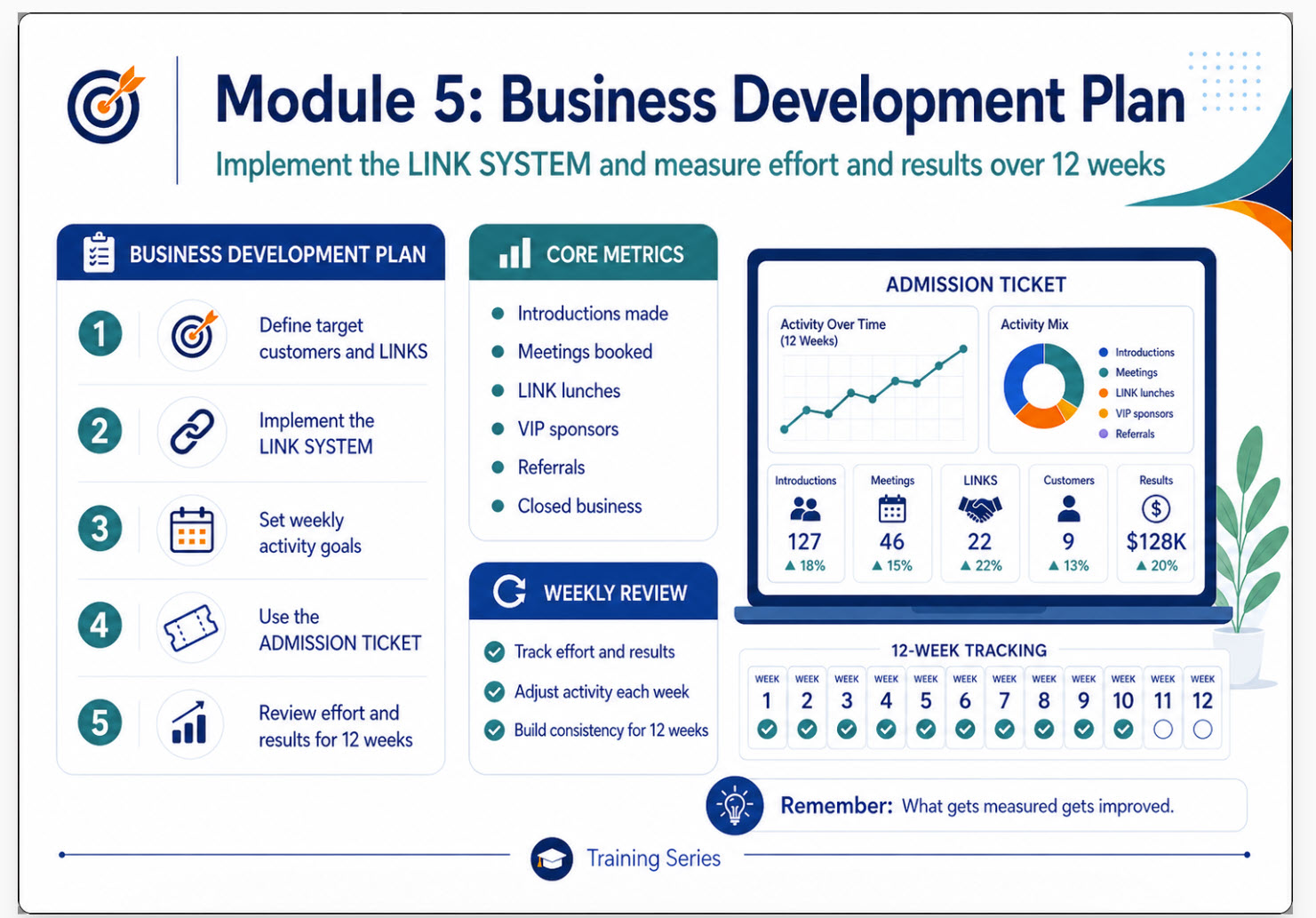
The core metrics to track are leads, conversion rate, cost per lead, customer acquisition cost, retention, and ROI. These numbers help us understand what is working and what needs improvement.
Optimization is ongoing. Test one variable at a time, review results weekly, and double down on what works. The key reminder is that measurement makes improvement possible.
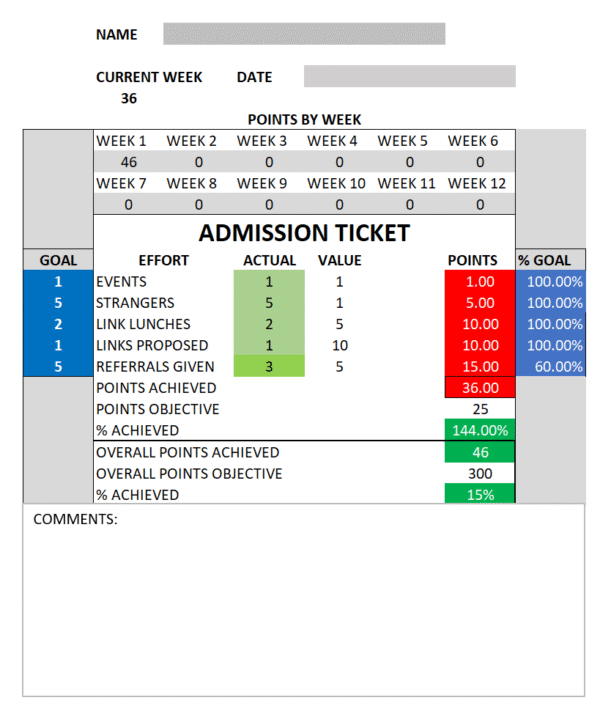
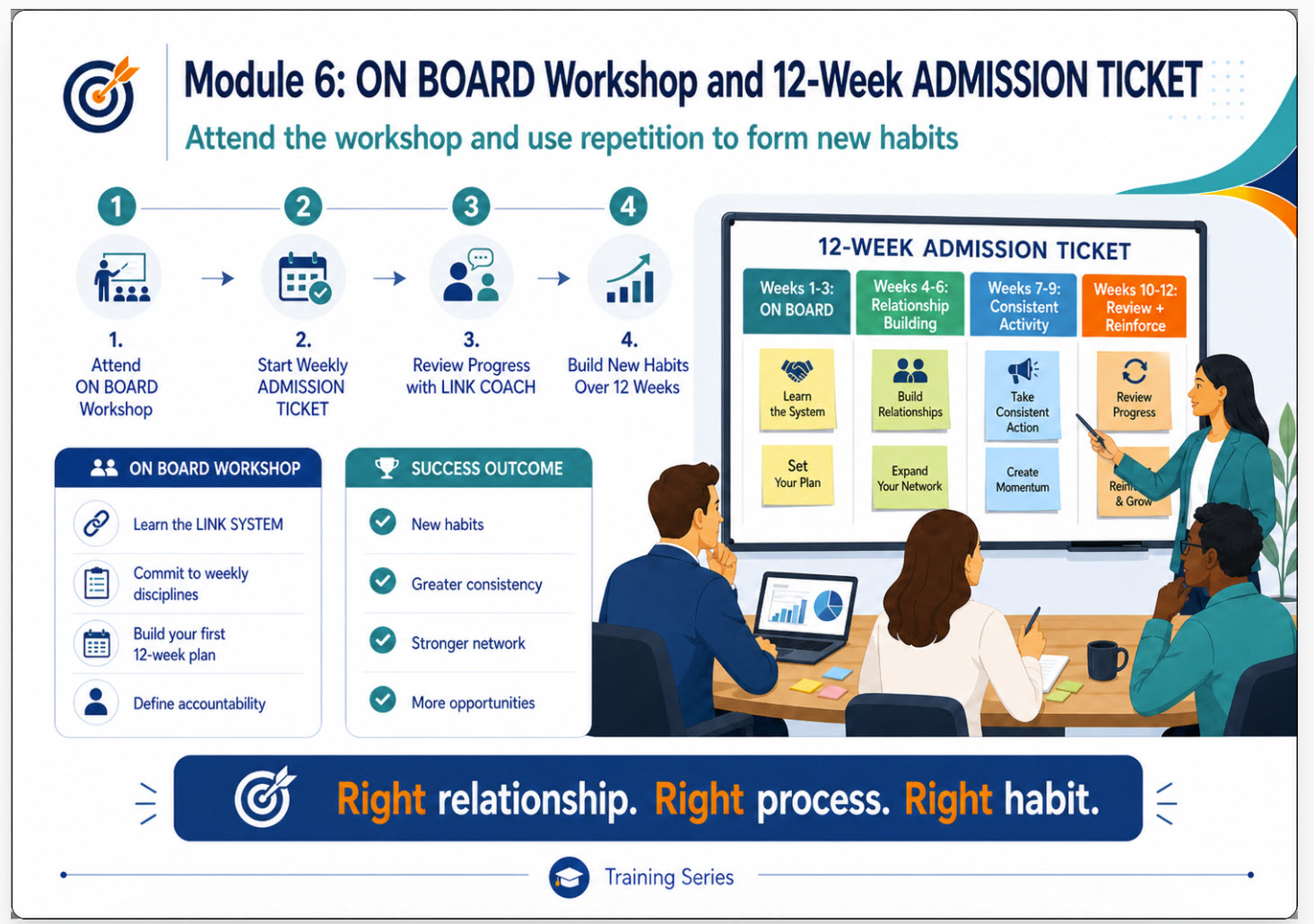
During the ADMISSION TICKET period, specifically the 1st 30 days, pay particular attention to honing your target market and discuss weekly with your LINK COACH
TOTAL RELATIONSHIP MARKETING | LINK FIELD GUIDE
LINK FIELD GUIDE
Identify Your Target Market
Build a Profile-Matched PROJECT 100 with ChatGPT.com and LinkedIn
A practical tutorial for converting the people you already know into a focused list of businesses, decision-makers, and warm introduction pathways.
THE OUTCOME At the end of this tutorial, you will have: (1) one clearly defined target market, (2) an Ideal Business Profile, (3) a scored list of 100 businesses and decision-makers, and (4) a weekly plan for introductions, LINK meetings, events, and referrals. |
THE WORKFLOW
1. PROJECT 100 | 2. CHATGPT.COM | 3. LINKEDIN | 4. LINK ACTIVITY |
Find patterns in the people and businesses you already know. | Turn those patterns into a precise market and business profile. | Find companies, decision-makers, and 1st/2nd-degree pathways. | Prioritize warm introductions and begin relationship-building. |
Recommended working time: 90–120 minutes for the first draft; 30 minutes weekly to improve and activate the list.
TOTAL RELATIONSHIP MARKETING | LINK FIELD GUIDE
1 | Understand What “Target Market” Means
A target market is not “anyone who needs what I sell.” It is a defined group of people or businesses with common characteristics, common needs, and a reasonable likelihood of buying, referring, or introducing you.
Separate these four decisions
Decision | Question to Answer | Example |
Target market | Which group do I intend to serve? | Privately owned dental practices in the Tampa Bay area |
Ideal Business Profile (IBP) | What makes a business a strong fit? | 2–10 locations; 15–100 employees; growing; owner-led |
Ideal Contact Profile (ICP) | Who inside the business should I meet? | Owner, managing partner, COO, or practice administrator |
Relationship pathway | Who can introduce me or create credibility? | Patient, vendor, banker, CPA, attorney, association leader |
IMPORTANT: USE AGE AS A RAPPORT HYPOTHESIS People often build trust more easily with prospects near their own age or life stage. A useful starting hypothesis is approximately five years younger to five years older than the LINK. Do not treat this as a rule, exclude qualified people, guess protected personal information, or ask ChatGPT/LinkedIn to infer exact ages. LinkedIn generally does not provide an age filter. Use professional stage, years in role, shared experiences, communication style, and relationship chemistry as ethical, observable proxies. |
Your first target-market statement
Complete: “I help [type of person/business] in [geography] who are experiencing [need/change] and are likely to value [result]. My best first contact is usually [role].”
Example: “I help owner-led dental groups in Tampa Bay with 2–10 locations that are growing or managing rising operating costs. My best first contact is usually the owner, managing partner, COO, or practice administrator.”
TOTAL RELATIONSHIP MARKETING | LINK FIELD GUIDE
2 | Mine Your PROJECT 100 for Evidence
PROJECT 100 is more than a name list. It is your relationship map. Begin with people you already know because the fastest path to a new prospect is often an introduction—not a cold message.
Step A — Complete the core fields
Field | What to Record |
Executive / contact | Full name and LinkedIn profile URL |
Company / position | Current employer, title, and tenure |
Company target market | Whom the company serves |
How known / relationship | Where you met, strength, and last contact |
Services offered | What the company sells or provides |
Target-market relevance | In your market, serves your market, or knows your market |
LINK to target market | Specific person, business, association, or event they can connect you to |
Step B — Code every name
Code | Meaning | Action |
A — Direct Fit | The person or company matches your target profile. | Request a LINK meeting or introduction. |
B — Pathway | Not a buyer, but connected to the market. | Ask for information, events, names, or introductions. |
C — Referral Partner | Also serves your market without directly competing. | Explore a symbiotic LINK relationship. |
D — Nurture | No current fit or clear pathway. | Maintain the relationship; revisit later. |
Step C — Look for patterns
Which industries appear most often?
Which occupations and leadership roles appear most often?
Which people have the strongest relationships with you?
Which markets do your best contacts already serve?
Which associations, events, communities, or geographic clusters repeat?
Where do you already have at least 10 possible pathways?
Choose the market where need, fit, access, and relationship strength overlap. Access matters: an attractive market with no credible pathway may be a secondary market, not your first market.
TOTAL RELATIONSHIP MARKETING | LINK FIELD GUIDE
3 | Use ChatGPT.com to Define the Market
ChatGPT should help you think, compare, organize, and prepare searches. It should not be treated as the final authority for current names, employment, phone numbers, or email addresses. Verify those details in LinkedIn, the company website, or another reliable source.
Prompt 1 — Discover candidate markets
COPY AND PASTE “I am a [profession/business] located in [geography]. I help clients achieve [outcome]. Below is a summarized list of industries, occupations, relationships, and company target markets found in my PROJECT 100: [paste a privacy-safe summary—do not paste sensitive personal data]. Identify 5 possible target markets. For each, explain the likely need, typical buyer, ease of access through my existing relationships, and potential referral partners. Rank them by fit, access, urgency, and revenue potential.” |
Prompt 2 — Select and define one market
COPY AND PASTE “Compare these candidate target markets: [list]. Score each from 1–5 for demonstrated need, ability to pay, concentration in [geography], ease of reaching the decision-maker, strength of my PROJECT 100 pathways, and referral potential. Recommend one primary market and explain the tradeoffs. Ask me up to five questions before deciding if important information is missing.” |
Prompt 3 — Create the Ideal Business Profile
COPY AND PASTE “For the selected target market, create an Ideal Business Profile using: industry/subindustry, geography, employee range, revenue range if useful, number of locations, ownership type, growth stage, common triggering events, likely needs, disqualifiers, and best decision-maker titles. Separate must-have criteria from preferred criteria.” |
Prompt 4 — Identify businesses that also target the market
COPY AND PASTE “List 15 noncompeting business categories that also sell to or advise [target market]. Explain what each category provides, which executive it knows, and how a symbiotic relationship could share ideas, information, resources, referrals, and introductions. Rank the best categories for a 12-member Target Market Network.” |
Prompt 5 — Translate age proximity responsibly
COPY AND PASTE “My approximate professional/life stage is [describe it without requesting private age data]. Suggest observable, ethical LinkedIn indicators of prospects likely to share similar career experience or business maturity. Do not infer or estimate anyone’s age. Include ways to communicate effectively with people outside my own age range.” |
TOTAL RELATIONSHIP MARKETING | LINK FIELD GUIDE
4 | Convert the Market into Search Criteria
Before opening LinkedIn, write the filters you intend to use. This prevents random browsing and makes your results repeatable.
Search element | Your decision | Example |
Geography | City, metro area, state, or service radius | Tampa Bay; within 50 miles |
Industry | Primary and adjacent LinkedIn industries | Medical practices; health and wellness |
Business size | Employees, locations, or revenue proxy | 11–200 employees; 2–10 locations |
Ownership / stage | Private, nonprofit, franchise, growth stage | Privately held; expanding |
Business signals | Events that can create need | Hiring, new location, new executive, acquisition |
Decision-makers | Titles and functions | Owner, Founder, President, COO, Administrator |
Relationship priority | Connection level and shared context | 1st degree first; then 2nd degree with warm path |
Professional-stage proxy | Observable business/career indicators | Years in role; leadership level; shared associations |
Build two Boolean title strings
Decision-maker string: (Owner OR Founder OR President OR CEO OR “Managing Partner”)
Operational influencer string: (COO OR Administrator OR “Practice Manager” OR “Operations Director”)
BOOLEAN BASICS Use quotation marks for an exact phrase, OR for alternatives, AND when both concepts must appear, NOT to remove a clearly irrelevant result, and parentheses to group alternatives. Keep searches simple at first; add filters one layer at a time so you can see which condition removes too many results. |
TOTAL RELATIONSHIP MARKETING | LINK FIELD GUIDE
5 | Find Businesses in LinkedIn
Option A — Standard LinkedIn
Enter a target-market or industry phrase in the LinkedIn search bar.
Select Companies to find business pages.
Use available filters such as location, industry, and company size when shown for your account.
Open each company page and verify its description, location, specialty, size, website, and current activity.
Record only businesses that meet your must-have profile criteria.
From the company page, select People or search LinkedIn People using the company as Current company to locate leaders and decision-makers.
Option B — LinkedIn Sales Navigator
Sales Navigator separates company research from people research: Account search finds businesses; Lead search finds individuals. Begin with accounts, save the qualified businesses, and then find leads inside those saved accounts.
Account search — businesses | Lead search — people |
Apply headquarters location, industry, company headcount, growth or other available company filters. | Apply geography, current company/account list, title, function, seniority, years in role/company, and connection filters as available. |
Review company description, headcount, growth, hiring, location, and recent activity. | Review current position, tenure, shared connections, recent activity, and relationship path. |
Save qualified companies to a named Account List. | Save appropriate decision-makers to a named Lead List. |
LIST NAMING STANDARD Use names that can be understood later: “Tampa Dental Groups — IBP — July 2026” for the Account List and “Tampa Dental Decision-Makers — July 2026” for the Lead List. Save the search when your plan supports it, and review new matches weekly. |
What to capture for every business
Business name and LinkedIn company URL
Website, location, industry, employee range, and number of locations
Why it matches the Ideal Business Profile
Likely need or triggering event
Best decision-maker and backup contact
1st-degree contact or 2nd-degree introduction pathway
Source and date verified
TOTAL RELATIONSHIP MARKETING | LINK FIELD GUIDE
6 | Apply the Relationship-First LINK Test
A business can fit the profile and still be a poor immediate priority. The LINK System begins with relationships. Score both business fit and access.
Factor | 0 points | 1 point | 2 points |
Business fit | Does not meet must-haves | Meets some criteria | Strong IBP match |
Need / timing | No visible need | Possible need | Clear trigger or urgency |
Decision-maker | Unknown | Role identified | Person verified |
Relationship path | No connection | 2nd/3rd-degree or shared group | 1st-degree or warm introducer |
Professional rapport | Little observable common ground | Some shared context | Strong shared experience or career-stage alignment |
Referral potential | One transaction only | Some network value | Strong two-way referral opportunity |
Priority score: 10–12 = Tier 1; 7–9 = Tier 2; 4–6 = Tier 3; 0–3 = research or remove.
The age-proximity guideline in practice
Do prioritize natural rapport and shared experiences when they are visible.
Do use years in role, career stage, shared organizations, community involvement, and business maturity as conversation clues.
Do keep excellent prospects outside the ±5-year hypothesis when fit, need, and access are strong.
Do not estimate age from photographs, graduation dates, names, or other indirect signals.
Do not record or use sensitive personal information unless the person voluntarily provided it and there is a legitimate reason.
Do adapt communication: ask questions, listen for preferences, and mirror the prospect’s desired pace and channel.
BEST PRACTICE Use the ±5-year idea to improve rapport planning—not to shrink the market. A 2nd-degree prospect outside your age range with an excellent warm introduction is normally more valuable than an age-similar stranger with no pathway. |
TOTAL RELATIONSHIP MARKETING | LINK FIELD GUIDE
7 | Build and Activate the Final PROJECT 100
Your working list should combine qualified businesses, the right people, and the relationship pathway. A company name alone is not actionable.
# | Business | Decision-maker | Why in profile | Warm pathway | Score | Next action |
1 | Example Dental Group | Jordan Lee, COO | 4 locations; expanding | Pat Smith → Jordan | 11 | Ask Pat for introduction |
2 | Example Practice | Morgan Diaz, Owner | Owner-led; 28 employees | Shared association | 9 | Attend association event |
3 | Example Advisors | Taylor Chen, Partner | Serves dental groups | 1st-degree contact | 10 | Invite to LINK meeting |
Recommended 100-business mix
Tier | Quantity | Purpose |
Tier 1 | 25 | Strong fit + strong access; pursue now |
Tier 2 | 35 | Strong fit with a developing pathway; research and cultivate |
Tier 3 | 25 | Possible fit; watch for triggers and connections |
Referral partners / influencers | 15 | Businesses and people who also target the market |
Weekly LINK activity
Review 10 PROJECT 100 records and update employment, company, pathway, and next action.
Request 2–3 warm introductions from people who already know and trust you.
Invite qualified people to a LINK meeting or LINK Lunch.
Attend one target-market event and meet five new people.
Ask the Fabulous 4: company, role, tenure, and company target market.
Give referrals and introductions before asking others to help you.
Add new information immediately; never allow the list to become a static spreadsheet.
TOTAL RELATIONSHIP MARKETING | LINK FIELD GUIDE
8 | Quality Control and Ethical Use
Verify before contacting
Confirm that the person still works at the company.
Confirm the role and whether the person can decide, influence, or introduce.
Confirm that the business truly serves the stated market and geography.
Use the company website for public phone numbers and official contact channels.
Label guessed or incomplete information as unverified; do not present it as fact.
Record the verification date because people and companies change.
Protect relationships
Never scrape, export, or automate activity in ways that violate platform rules.
Avoid mass, generic connection requests. Personalize around a real reason to connect.
Ask permission before using someone’s name as an introducer.
Do not upload confidential PROJECT 100 details into ChatGPT. Use summaries or remove identifying information.
Respect opt-outs and communication preferences.
Treat LinkedIn as a relationship map—not merely a list of names to solicit.
Common mistakes
Mistake | Correction |
Choosing a market only because it is large | Choose the intersection of need, value, concentration, and access. |
Searching people before defining businesses | Build the Account/Business list first, then find the right Leads. |
Treating every contact as a prospect | Code each contact as direct fit, pathway, partner, or nurture. |
Using age as an exclusion | Use professional rapport as a flexible hypothesis and prioritize relationship strength. |
Trusting AI-generated contact data | Verify names and current details in authoritative public sources. |
Collecting 100 names with no next action | Every Tier 1 and Tier 2 record needs a pathway and dated next step. |
SUCCESS TEST You are finished when another LINK can read your profile, reproduce your LinkedIn search, understand why every Tier 1 business belongs, see who can make each introduction, and know the next action without asking you to explain the list. |
TOTAL RELATIONSHIP MARKETING | LINK FIELD GUIDE
Worksheet | Your Target Market Search Plan
My target-market statement
________________________________________________________________________________
________________________________________________________________________________
________________________________________________________________________________
My must-have Ideal Business Profile criteria
________________________________________________________________________________
________________________________________________________________________________
________________________________________________________________________________
________________________________________________________________________________
My preferred criteria
________________________________________________________________________________
________________________________________________________________________________
________________________________________________________________________________
My disqualifiers
________________________________________________________________________________
________________________________________________________________________________
________________________________________________________________________________
My primary decision-maker titles
________________________________________________________________________________
________________________________________________________________________________
My referral-partner categories
________________________________________________________________________________
________________________________________________________________________________
________________________________________________________________________________
My geography and search radius
________________________________________________________________________________
________________________________________________________________________________
My observable professional-stage/rapport indicators (not age estimates)
________________________________________________________________________________
________________________________________________________________________________
________________________________________________________________________________
My LinkedIn Account search filters
________________________________________________________________________________
________________________________________________________________________________
________________________________________________________________________________
________________________________________________________________________________
My LinkedIn Lead search filters and Boolean title string
________________________________________________________________________________
________________________________________________________________________________
________________________________________________________________________________
________________________________________________________________________________
My first five introduction requests
Introducer | Prospect / business | Reason for introduction | Date / next step |
TOTAL RELATIONSHIP MARKETING | LINK FIELD GUIDE
Quick Reference | Copy-and-Paste Search Sequence
Summarize your PROJECT 100 patterns without sensitive personal details.
Ask ChatGPT to suggest and score five possible target markets.
Select one market and have ChatGPT produce must-have and preferred Ideal Business Profile criteria.
Ask ChatGPT for noncompeting businesses that also target the selected market.
Translate the business profile into LinkedIn Account/Company filters.
Find and save qualified businesses; verify each on LinkedIn and its website.
Search for Leads/People inside the qualified businesses using decision-maker title variations.
Prioritize 1st-degree relationships and 2nd-degree warm introductions.
Score fit, timing, decision-maker access, rapport, and referral potential.
Place the best 100 into PROJECT 100 with a specific next action and verification date.
ONE-SENTENCE RULE Do not ask, “Who can I sell to?” Ask, “Which businesses clearly fit my profile, who is the right person inside each one, and who already knows them well enough to make a credible introduction?” |
Source note
LinkedIn interfaces and available filters vary by subscription, region, and product updates. The workflow in this guide reflects LinkedIn and Sales Navigator search conventions reviewed in July 2026. Always use the filters currently displayed in your account and verify results before acting.
Prepared for Total Relationship Marketing LINKS • July 2026
LINK Target-Market Search Tutorial
Purpose
Once a LINK has identified a target market, the next objective is to find:
- The types of noncompeting businesses that also serve or influence that target market.
- Three local businesses in each category and the appropriate executive or decision-maker at each business.
This creates the foundation for a TARGET MARKET NETWORK whose members can share ideas, information, resources, referrals, and introductions.
SEARCH 1: Use ChatGPT to Identify Business Categories
Information to Have Ready
Before beginning, define:
- Target market: [Example: Women business owners]
- Geographic market: [Example: Tampa Bay, Florida]
- LINK’s industry: [Example: Business coaching]
- Ideal client description: [Company size, income, age, occupation, or other characteristics]
- Number of business categories desired: [Recommended: 12–20]
Step 1: Ask ChatGPT for the Business Categories
Copy, customize, and submit this prompt at ChatGPT.com:
I am a member of Total Relationship Marketing, and my target market is [TARGET MARKET] in [CITY OR REGION].
I want to develop relationships with noncompeting businesses and professionals that also sell to, advise, serve, employ, influence, or maintain trusted relationships with this target market.
Create a list of 20 business categories that are most likely to have established relationships with members of this target market.
For each category, provide:
- Business category
- Why it targets or influences this market
- Services it provides to the target market
- The executive or decision-maker I should meet
- Potential ideas, information, resources, referrals, or introductions we could share
- Whether the category is a strong, moderate, or secondary LINK opportunity
Exclude my industry, which is [LINK’S INDUSTRY], and avoid categories that directly compete with one another.
Step 2: Ask ChatGPT to Prioritize the Categories
After receiving the initial list, submit:
Review the preceding categories and select the 12 strongest noncompeting businesses for a TARGET MARKET NETWORK.
Rank them according to:
- Frequency of contact with the target market
- Level of trust they have with the target market
- Ability to provide introductions
- Potential to receive referrals from other NETWORK members
- Likelihood that the business owner or executive participates in professional networking
Explain why each category belongs in the top 12.
Step 3: Identify Search Terms
Submit this follow-up prompt:
For each of the 12 selected business categories, give me:
- The LinkedIn industry classifications that may apply
- Five keywords to use when searching for businesses
- Five executive titles to search for
- A Boolean search phrase for LinkedIn Sales Navigator
- Words or business types that should be excluded
Present the results in a table that I can use as a LinkedIn Sales Navigator search guide.
Example Boolean Search
For businesses serving transitioning veterans:
("veteran employment" OR "military transition" OR "workforce development")
NOT ("federal agency" OR recruiter)
For decision-makers:
(Owner OR Founder OR President OR CEO OR "Managing Partner")LinkedIn searches can recognize AND, OR, NOT, quotation marks, and parentheses. Capitalize the Boolean operators.
Step 4: Challenge and Refine the Results
Ask ChatGPT:
Which important business categories might be missing from this list?
Identify organizations that may not directly sell to [TARGET MARKET] but regularly influence, advise, convene, or introduce members of this market. Include associations, nonprofits, publications, event organizers, educational institutions, and community leaders where appropriate.
Search 1 Deliverable
The LINK should finish Search 1 with:
- A prioritized list of 12–20 business categories.
- A description of why each category serves the target market.
- Appropriate executive titles.
- Keywords and Boolean search phrases.
- A final selection of approximately 12 noncompeting categories for the NETWORK.
SEARCH 2: Use LinkedIn and Sales Navigator to Find Local Businesses
This search has two stages:
Part A: Find Three Local Companies in Each Category
Step 1: Open Account Search
- Sign in to LinkedIn Sales Navigator.
- Select Account Filters or Search → Accounts.
- Search one business category at a time.
The names and placement of filters can vary slightly by Sales Navigator subscription and interface version.
Step 2: Apply Account Filters
Use as many of these filters as are available:
| Filter | What to Enter |
|---|---|
| Headquarters location | The LINK’s city, metropolitan area, or region |
| Industry | The applicable LinkedIn industry |
| Keywords | Terms generated during Search 1 |
| Company headcount | The preferred size of business |
| Annual revenue | Optional, if relevant |
| Headcount growth | Optional indicator of an expanding company |
| Department headcount | Optional, when a particular department matters |
Current Sales Navigator guidance continues to emphasize geography, industry, company size, growth, and related company filters for Account searches. 2026 filter guide
Step 3: Evaluate Each Company
Do not automatically select the first three results. Open each company’s LinkedIn page and determine:
- Does it actually serve the identified target market?
- Is it locally operated or merely listed as having a local presence?
- Does it offer a complementary, noncompeting service?
- Does it appear active and established?
- Is there an identifiable local owner or executive?
- Would it potentially give and receive referrals?
- Does the company have a functioning website and current contact information?
Step 4: Save Qualified Companies
Create an Account List named:
[TARGET MARKET] – Potential LINK Partners
Save the best three qualified businesses in each category.
If no qualified company appears:
- Expand the geographic radius.
- Try another LinkedIn industry.
- Search using service keywords.
- Search the company name on regular LinkedIn.
- Ask ChatGPT for alternate names used by that industry.
Part B: Identify the Right Executive at Each Business
Step 1: Open Lead Search
Once a company has been selected:
- Open Lead Filters.
- Enter the company in Current Company.
- Add the appropriate local geography.
- Apply decision-maker filters.
Step 2: Use Decision-Maker Filters
| Filter | Recommended Selection |
|---|---|
| Current company | Selected local business |
| Geography | Local city or metropolitan area |
| Seniority level | Owner, Partner, CXO, VP, Director |
| Current job title | Owner, Founder, President, CEO, Managing Partner |
| Function | Select the function appropriate to the category |
| Years in current position | Optional |
| Connection level | Prioritize first- and second-degree relationships |
| Posted on LinkedIn | Useful for finding active members |
| Changed jobs | Optional relationship-opening opportunity |
Useful title search:
(Owner OR Founder OR President OR CEO OR "Managing Partner" OR "Executive Director")For a larger organization, the correct contact might instead be:
("Business Development" OR "Community Relations" OR Partnerships OR Marketing)
AND
(VP OR Director OR Head)
Step 3: Look for the Best Path to an Introduction
For each executive, determine:
- Is the person already a first-degree connection?
- Which mutual connections are displayed?
- Is there a second-degree connection who could introduce the LINK?
- Do any existing LINKS know the executive?
- Does the executive belong to the same organization, association, school, veteran group, or professional community?
- Has the executive recently posted something that provides a natural conversation starter?
The objective is to turn Six Degrees of Separation into One by finding the strongest relationship pathway—not merely collecting a name.
Step 4: Record Available Contact Information
LinkedIn and Sales Navigator do not guarantee that an executive’s email address or telephone number will be displayed. Contact details depend on what the member has provided and their visibility settings.
Check:
- The executive’s Contact Info section.
- The company’s LinkedIn page.
- The company website.
- The website’s contact, leadership, or “About Us” page.
- The company’s public telephone number.
- Any publicly listed professional email address.
Do not guess an email address and record it as verified. Label information as:
- Verified
- Probable—requires verification
- Not publicly available
Required Research Worksheet
Complete one row for every company:
| Information | Entry |
|---|---|
| Target market | |
| Business category | |
| Company name | |
| Description | |
| Services provided | |
| Why it reaches the target market | |
| Street address | |
| City/state/ZIP | |
| Website | |
| Main telephone | |
| LinkedIn company page | |
| Executive’s name | |
| Executive’s title | |
| Executive’s LinkedIn profile | |
| Professional email | |
| Mobile/direct telephone | |
| Mutual connections | |
| Best potential introducer | |
| Ideas/resources to share | |
| Potential referrals to give | |
| Potential referrals to receive | |
| Research date | |
| Contact information status | Verified / Unverified |
Final ChatGPT Prompt: Organize the Research
After manually gathering the LinkedIn and Sales Navigator information, paste it into ChatGPT with this prompt:
Organize the following research into a TARGET MARKET NETWORK prospect list.
My target market is [TARGET MARKET], and my location is [LOCATION].
Group the companies by business category. Select the three strongest local businesses in each category.
For every business, include:
- Company name
- Business description
- Address
- Website
- Main telephone number
- LinkedIn company page
- Executive’s name and title
- Executive’s LinkedIn profile
- Publicly available email and direct telephone number
- Mutual connections or best pathway to an introduction
- Why the company is a potential LINK partner
- Ideas, information, resources, referrals, or introductions that could be shared
Do not invent missing information. Clearly identify anything that requires verification.
Rank each business as Priority A, B, or C based on its relationship with the target market, local influence, referral potential, and accessibility of the executive.
Expected Final Result
If ChatGPT identifies 12 business categories and the LINK researches three companies per category, the completed project will contain:
- 12 noncompeting business categories
- 36 qualified local businesses
- 36 owners or executives
- Potential paths for warm introductions
- A prioritized prospect list for building a TARGET MARKET NETWORK
The final step is to move the strongest executives into the LINK’s Project 100 and begin seeking promoted introductions through existing LINKS and mutual connections.